

Automatic renewal reminders for your clients
Add the deadline once. Dotify emails the client 60, 40 and 15 days before, with the wording you chose, and updates the deadline's status after every email.
The free plan doesn't ask for a card. The demo doesn't even ask you to sign up.
Why hand-written reminders get skipped
Not out of laziness. Because they depend on the day you remember to look.
They go out when you remember
A reminder written by hand goes out on the day you check the calendar. In busy weeks that day comes late, or never.
Every client is a copy-paste
Same text, name to change, date to double-check, amount to look up. With twenty renewals a month it is work nobody invoices.
You don't know where you stand
Did the first notice go out? And the second? If the answer lives in your Sent folder, nobody else in the agency has it.
How they work
Add the deadline once
Client, service, date, amount and how often it renews. When you record the payment, a recurring deadline rolls over to the next cycle on its own and the sequence starts again.
Rules decide when to write
Each rule says: «X days before the due date, send this email». Dotify keeps checking which deadlines have reached that point and sends at the time you chose.
The status updates itself
After each email the deadline moves to the next status: to renew, notified, notified twice. You look at the list and know where every client stands.
The sequence that comes ready
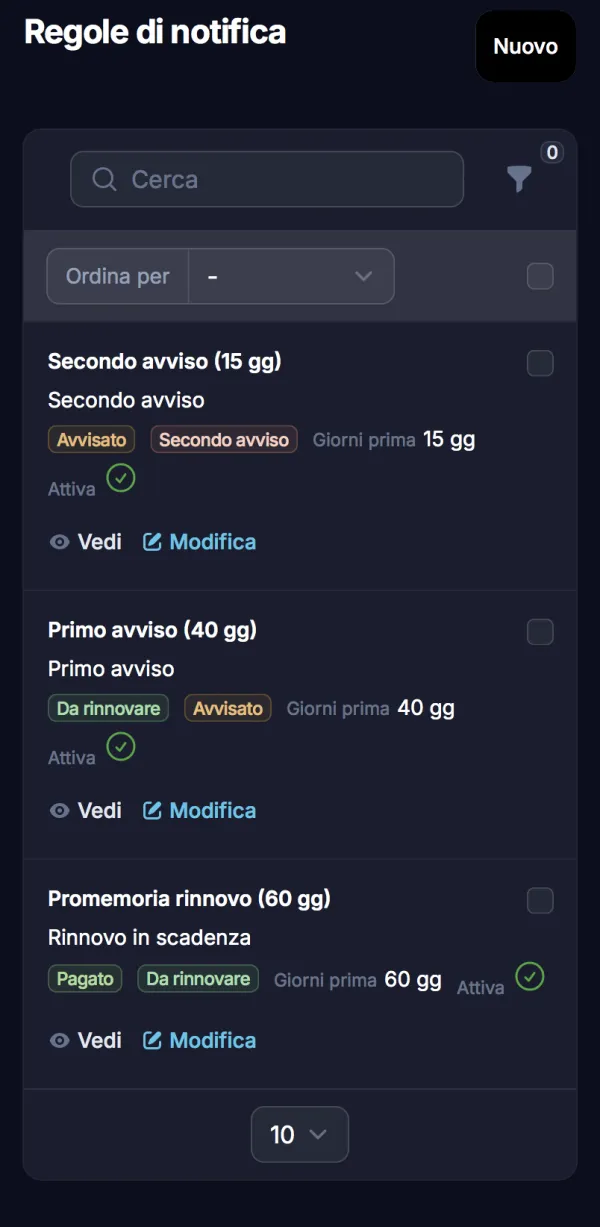
Every new account starts with these three rules and their texts, in five languages. Emails go out at 10:00. You can change all of it.
| When | Rule | Deadline status | Email subject |
|---|---|---|---|
| 60 days before | Renewal reminder | Paid → To renew | «Hosting Studio Bianchi» is coming up for renewal |
| 40 days before | First notice | To renew → Notified | Reminder: renewing «Hosting Studio Bianchi» |
| 15 days before | Second notice | Notified → Notified twice | Last reminder: «Hosting Studio Bianchi» is due on 12/11/2026 |
What the client receives
A short, polite email with a summary of the service: type, name, date and amount. Dotify fills in the client name and the deadline details.
The tone rises along the sequence: the first message informs, the last one points to the date. If the wording doesn't sound like you, rewrite it.
Alongside, the default text of the first message, with sample data.
Subject
Hosting Studio Bianchi is coming up for renewal
Renewal coming up
Hi Marco Bianchi,
we're reaching out because we look after your “Hosting Studio Bianchi” service, which is approaching its renewal date of 12/11/2026.
To keep everything running without interruption, it just needs to be renewed by that date. Here's the summary:
| Type | Hosting |
| Deadline | Hosting Studio Bianchi |
| Due date | 12/11/2026 |
| Amount | 180,00 € |
To go ahead, simply reply to this email and we'll handle the renewal for you.
Best regards
You always know what went out
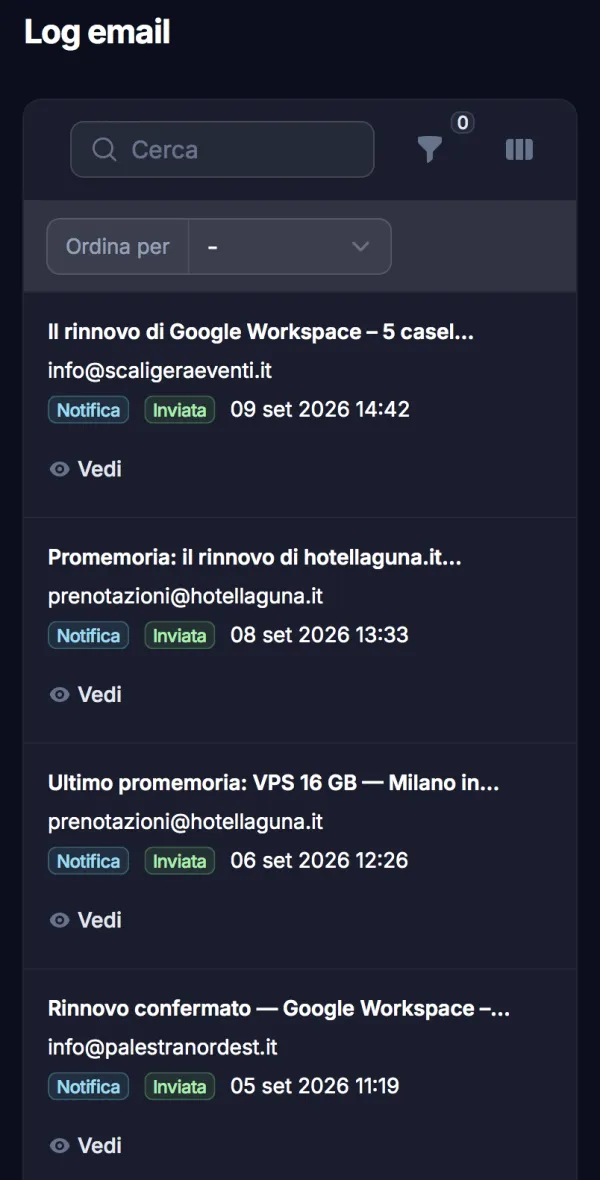
Every email lands in the log: to whom, when, with which subject, and whether it was sent or failed. When a client says «I never got anything», you check in ten seconds.
No more digging through the Sent folder of whoever wrote that month.
What you can change
The starting sequence works for many. When it isn't enough, it adapts.
Days and time
Change the days on each rule, add more, pick the sending time. The time follows your organisation's timezone.
Rules per service type
A rule can apply to one type only: domains with one sequence, maintenance contracts with another.
Your own wording
One template per rule, with client and deadline fields. For a client with special terms you set a text on that single deadline.
Five languages
Italian, English, Spanish, German and French. Each client gets the version in their own language.
Rules on pause
Switch a rule off without deleting it: in August, or while you try out new wording.
Manual send when you need it
From the deadline list, «Send reminder» emails that client straight away, without waiting for the rule.
On the free plan and on paid plans
Automatic reminders are on every plan. What changes is how many clients you add and which address the emails come from.
| Free | Essential · Plus · Ultimate | |
|---|---|---|
| Automatic reminders and rules | Yes | Yes |
| Clients and deadlines | 5 clients, 3 deadlines per client | From 15 clients to unlimited, unlimited deadlines |
| Email sender | Dotify's server | Your own domain, with your SMTP |
| Block email editor, your logo and footer | No | Yes |
| Templates in 5 languages | Yes | Yes |
Questions about reminders
Can I send reminders on WhatsApp or by SMS?
No. Right now reminders go out by email only.
The client has already paid: does the second notice still go out?
No, as long as you record the payment. Each rule only fires on deadlines in its starting status: a paid recurring deadline rolls over to the next cycle, with the date moved forward, and this round's reminders stop. An archived deadline drops out of the rules.
What if the date has already passed?
Dotify doesn't send «before the due date» reminders for a date that has already gone: they would be meaningless emails about old renewals. You find the deadline among the overdue ones on the dashboard.
Which address do the emails come from?
On the free plan, from Dotify's server. On paid plans you can connect your own SMTP, so the client gets the email from your agency's domain.
Does the client need to sign up anywhere?
No, they get a normal email. If you like, you can also give them access to the client portal, where they see their deadlines with a code sent by email and no password.
Let Dotify remember the next renewal
Create an account, add a client and a deadline: the sequence is already on. Or watch it run in the demo, with sample data.